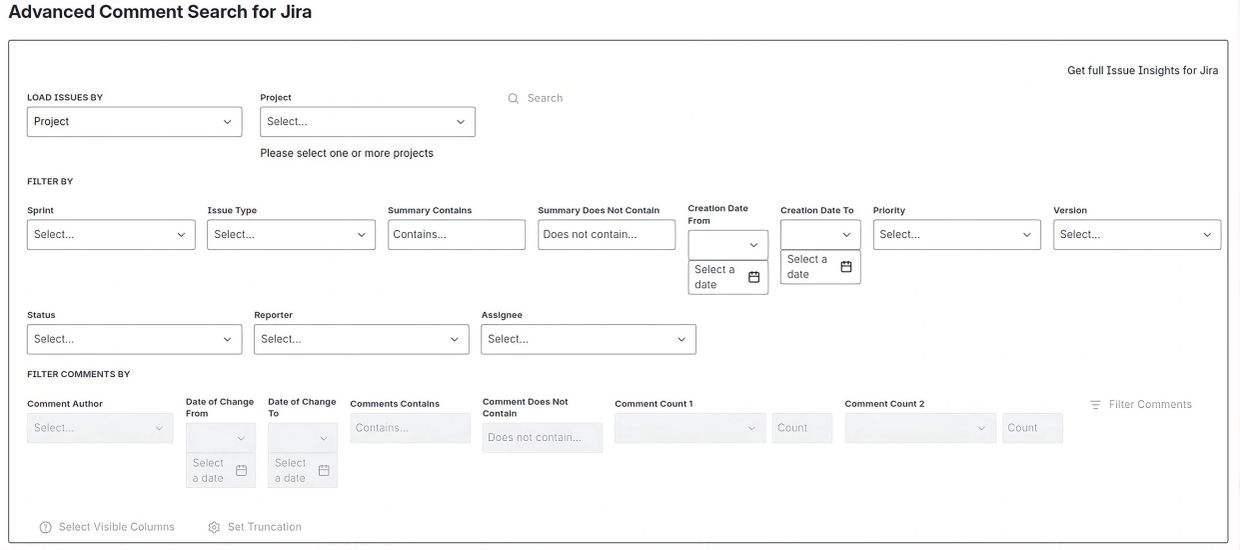
The first step is to select the issues you want to analyze.
Use the Load Issues By section to choose how issues will be loaded. You can load issues using one of the following methods: Project, Assignee, Creation Date, Filter, Issue Type, Label, Priority, Reporter, Status, Sprint, Summary, or Version.
By default, Project is selected.
After selecting a loading method and its corresponding values, you can use the Filter By section to further narrow the issues that will be loaded.
Available issue filters include: Sprint, Issue Type, Summary Contains, Summary Does Not Contain, Creation Date Range, Priority, Version, Status, Reporter, and Assignee.
Once all desired criteria have been entered, click Search.
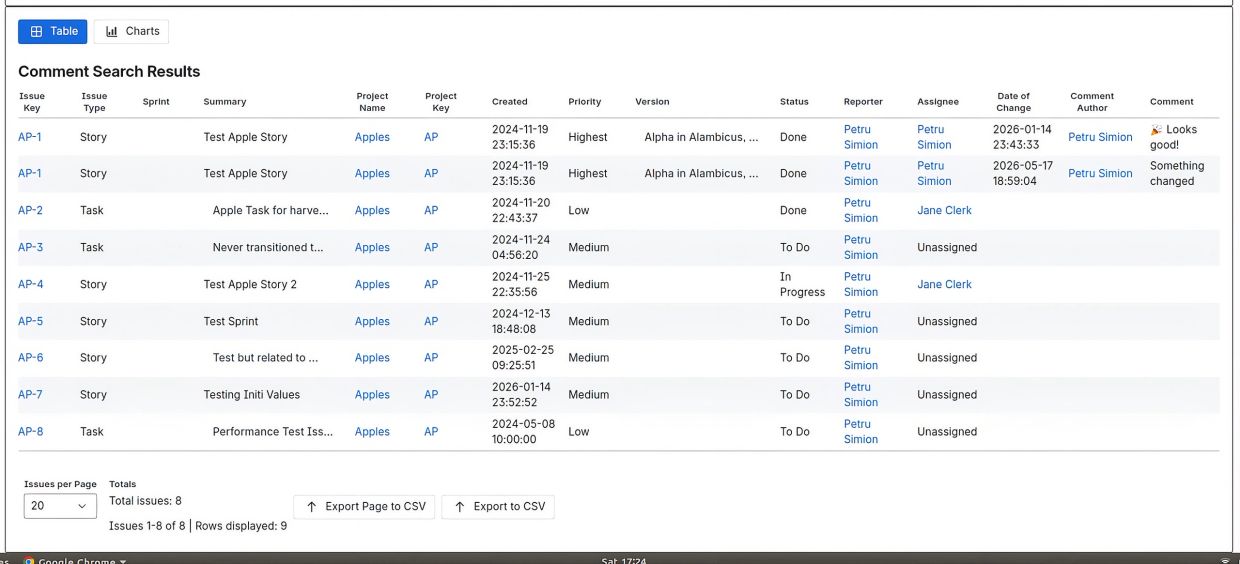
The search results are displayed in a table containing the comments associated with the issues returned by the initial search. Depending on the criteria selected in the Load Issues By and Filter By sections, the result set may represent all retrieved issues or a filtered subset of those issues.
Each row represents a comment and includes the associated issue information together with the comment author, comment content, and the date the comment was created or updated.
The Set Visible Columns option allows users to choose which columns are displayed in the table, making it easier to focus on the information most relevant to their analysis.The Set Truncation option allows selected columns containing large text values, such as summaries or comments, to be truncated to 22 characters for improved readability and better use of screen space. Truncation affects only the table display and does not modify the underlying data.The application provides two export options:
- Export Page to CSV exports only the records displayed on the current page.
- Export to CSV exports the complete result set.
Both export options always include all available columns and export values in their complete, untruncated form, regardless of any visible column or truncation settings applied to the table.The Refresh Data option allows users to reload data from Jira before performing a new search, ensuring that the latest issue and comment information is included in the results.

After the initial search results are displayed, the Filter Comments By section becomes available. These filters allow users to perform additional searches within the comments already loaded into the result set without reloading issues from Jira.
Comment filters can be used to narrow the results based on criteria such as comment author, comment content, comment count, comment dates, and other comment-specific attributes. This enables users to quickly focus on the comments most relevant to their analysis while working with the already retrieved issue set.
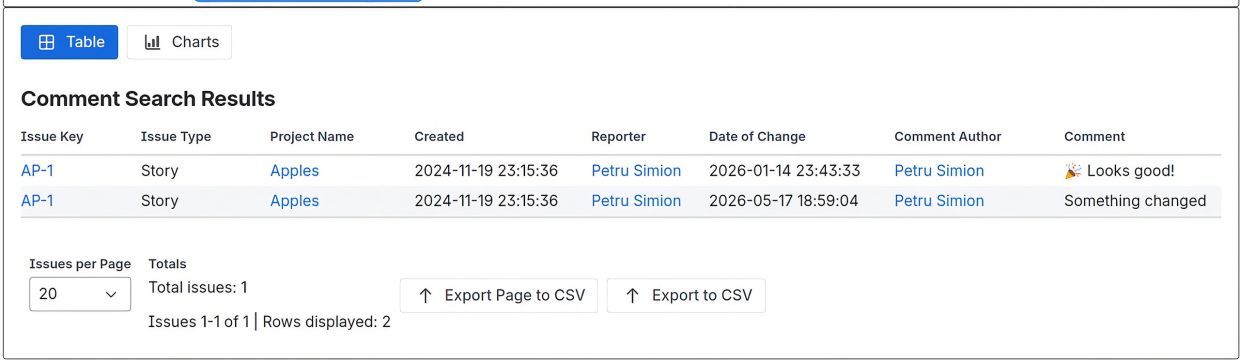
In this example, the initial search has already retrieved a set of issues based on the selected Load Issues By and Filter By criteria. The comment filters are then used to further narrow the results so that only issues containing at least one matching comment are displayed.
As shown in the example, the result set has been filtered to include only issues that contain at least one comment, allowing users to focus exclusively on issues with comment activity while excluding issues that do not contain comments.
Step 4: Filter Comments
Once the initial data has been loaded, the Filter Comments By section becomes available.
Unlike the issue-loading filters, comment filters operate directly on the loaded data and do not perform another Jira search.
Available comment filters include:
- Comment Author
- Date of Change From / To
- Comments Contains
- Comment Does Not Contain
- Comment Count conditions
Click Filter Comments to refine the displayed results.
Because comment filtering is performed on the data already loaded into memory, results are returned immediately without reloading issues from Jira.

- The application provides Bar, Stacked Bar, and Pie chart visualizations to help analyze comment activity across the retrieved issue set.
Charts can be generated using the following criteria: Comment Author, Project, Issue Type, Status, Priority, Assignee, Reporter, Sprint, and Changes Over Time.
These visualizations allow users to quickly identify comment activity patterns, distribution of comments across projects and issue types, participation by reporters, assignees, and comment authors, as well as trends in comment activity over time.
Chart generation requires additional processing of the returned data and is therefore recommended for result sets containing up to approximately 100,000 issues, although larger datasets may also be processed depending on the number of comments involved.
The application itself is designed for enterprise-scale Jira environments and supports searching and reporting across instances containing millions of issues through its paginated processing architecture.
- The application provides Bar, Stacked Bar, and Pie chart visualizations to help analyze comment activity across the retrieved issue set.
Charts can be generated using the following criteria: Comment Author, Project, Issue Type, Status, Priority, Assignee, Reporter, Sprint, and Changes Over Time.
These visualizations allow users to quickly identify comment activity patterns, distribution of comments across projects and issue types, participation by reporters, assignees, and comment authors, as well as trends in comment activity over time.
Chart generation requires additional processing of the returned data and is therefore recommended for result sets containing up to approximately 100,000 issues, although larger datasets may also be processed depending on the number of comments involved.
The application itself is designed for enterprise-scale Jira environments and supports searching and reporting across instances containing millions of issues through its paginated processing architecture.